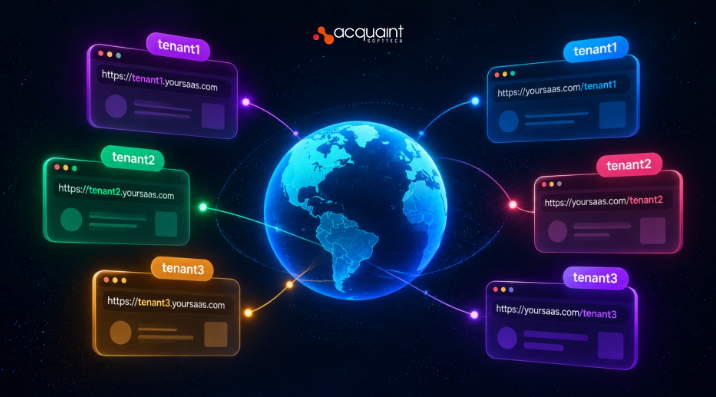
As a Solutions Architect at Acquaint Softtech, a software product development partner for SaaS founders, I hear one routing question early in almost every multi-tenant build: should each customer live at acme.yourapp.com or at yourapp.com/acme?
Your URL strategy decides how you identify tenants, how you issue TLS certificates, how browser cookies are isolated, and how easily you can offer custom domains later. This guide compares both approaches and shows when each one wins.
Switching patterns after launch means rewriting links, sessions, and DNS for every customer, so it pays to decide once. The guidance here draws on multi-tenant platforms Acquaint Softtech has delivered as an Official Laravel Partner, with 1,300+ projects, 70+ in-house engineers, and clients across the USA, UK, Europe, and Australia who get a dedicated team within 48 hours of a brief.
What URL-based tenant routing is
Tenant routing is the step where your application reads an incoming request and works out which customer account it belongs to. In URL-based routing, that identity lives in the address itself: in the host name for subdomain routing, or in the first path segment for path-based routing.
Why the decision comes first
Every later layer depends on it: middleware, database scoping, cache keys, file storage, and links in emails. A tenant resolver that runs first on every request is the foundation the rest of the multi-tenant stack is built on.
Sub-domain vs path-based at a glance
Sub-domain routing gives each tenant its own host name and stronger browser isolation. Path-based routing keeps every tenant on one host and is simpler to launch. The table summarises the trade-offs.
| Factor | Sub-domain (acme.app.com) | Path-based (app.com/acme) |
| Tenant identified by | Host header | First URL segment |
| DNS setup | One wildcard record | Nothing beyond the main domain |
| TLS certificate | Wildcard certificate | One standard certificate |
| Browser isolation | Separate origin per tenant | One shared origin |
| Custom domains | Natural next step | Needs a routing rework |
| Local development | Needs host mapping | Works on localhost |
| Real-world example | Slack workspaces | GitHub organisations |
How subdomain routing works
Subdomain routing points a wildcard DNS record, such as *.yourapp.com, at your load balancer, then reads the host name on every request to find the tenant. One record serves every current and future customer, with no DNS change per signup.
Wildcard DNS and TLS certificates
A wildcard certificate for *.yourapp.com covers one subdomain level only, so acme.yourapp.com is secured, but eu.acme.yourapp.com is not. Let’s Encrypt issues wildcard certificates only through the DNS-01 challenge, so your DNS provider needs an API your automation can call. Teams that hire DevOps engineers usually automate this renewal alongside ingress and load balancer config, so certificates never lapse silently.
Reserve names at signup
Block subdomains such as www, api, admin, app, and mail during signup. Otherwise, a customer can claim a name that collides with your infrastructure.
How path-based routing works
Path-based routing reads the tenant slug from the first URL segment, such as /acme/dashboard, and scopes the request to that tenant. It needs no extra DNS records or certificates, which makes it the fastest pattern to ship.
The prefix discipline problem
Every link, redirect, asset URL, and API call must carry the tenant prefix. One missed prefix sends a user to the wrong route or a 404, so generate every URL through a single helper that injects the slug instead of hand-writing paths.
Security and isolation differences
The biggest difference is browser isolation. Browsers define an origin by scheme, host, and port, so all path-based tenants share one origin, while each subdomain tenant gets its own.
Cookies and local storage
On a shared origin, cookies, localStorage, and service workers are shared across tenants in the same browser. MDN states that the cookie Path attribute is not a security boundary, so it cannot shield one tenant’s session from another tenant’s scripts. Subdomains allow host-only cookies, which the browser sends only to the exact host that set them.
Real isolation still lives on the server
URL routing identifies the tenant; it does not protect data. Always confirm the signed-in user belongs to the resolved tenant, and scope every query by tenant ID, whichever pattern you choose.
Custom domains and SEO
Sub-domain routing is the natural stepping stone to custom domains, because both identify tenants by host name. A customer points a CNAME record, such as portal.acme.com, at your platform, and the same host lookup finds them.
Certificates for customer domains
Custom domains cannot use your wildcard certificate, so each one needs its own. Tools such as Caddy on-demand TLS or Cloudflare for SaaS issue a certificate per hostname automatically once DNS ownership is verified. Shopify follows this model: every store gets a myshopify.com subdomain and can add its own domain.
Does the choice affect SEO?
For logged-in app screens, rarely, because search engines do not index pages behind authentication. It matters when tenants publish public pages, such as storefronts or help centres, where subdomains and custom domains give each tenant a distinct, brandable site.
Implementing tenant resolution in Laravel
In Laravel, you resolve tenants with a route group plus middleware: Route::domain(‘{tenant}.yourapp.com’) for subdomains, or Route::prefix(‘{tenant}’) for paths. The middleware loads the tenant once and shares it with the rest of the request.
Package or custom build
The open-source stancl/tenancy package ships middleware for domain, subdomain, and path identification, while spatie/laravel-multitenancy uses a pluggable tenant finder. Our Laravel development services team usually starts with a package and customises the resolver when a product needs hybrid routing or custom domains.
Design for hybrid routing
Mature platforms often support all three: sub-domains by default, custom domains on premium plans, and paths for internal tools. Build the resolver as a chain of strategies, so adding one later is a configuration change, not a rewrite.
Which strategy to choose
Choose sub-domains when tenants are businesses that expect a branded address, stronger isolation, or custom domains later. Choose paths when you need to launch fast, or when one user moves between many workspaces in a single session.
| If your product… | Choose |
| Sells branded portals to businesses | Sub-domain |
| Plans custom domains on higher plans | Sub-domain |
| Is an MVP still validating demand | Path-based |
| Lets one user switch between many workspaces | Path-based |
| Needs region-specific hosts for data residency | Sub-domain |
FAQs
What is the difference between sub-domain and path-based multi-tenancy?
Sub-domain multi-tenancy identifies each tenant by host name, such as acme.app.com. Path-based multi-tenancy uses the first URL segment, such as app.com/acme. Sub-domains give stronger browser isolation and easier custom domains, while paths are simpler to launch.
Is subdomain multi-tenancy more secure?
It gives stronger browser isolation, because each subdomain is a separate origin with its own cookies and storage. Neither pattern secures data by itself, though. Server-side checks that scope every query to the resolved tenant are what actually keep tenant data apart.
Do I need a wildcard SSL certificate for sub-domain tenants?
Yes, a wildcard certificate for *.yourapp.com is the usual approach. It covers one subdomain level only. Let’s Encrypt issues wildcard certificates through the DNS-01 challenge, so automate renewal through your DNS provider’s API.
Can I offer custom domains with path-based routing?
Not easily. Custom domains are identified by hostname, so a path-based resolver needs reworking to read the host as well. Starting with subdomains, or a resolver built as a chain of strategies, makes custom domains a small addition.
Which is better for an MVP?
Path-based routing is usually faster for an MVP, since it needs no wildcard DNS or certificates. If you already know customers will want branded portals or custom domains, start with subdomains to avoid a costly migration later.
Can I switch from path-based to subdomain routing later?
Yes, but plan for effort. Every stored link, redirect, session cookie, and email template must change, and old URLs need permanent redirects to the new subdomains.
